 Sort Feed
DocsGetting started
Introduction
Sort Feed is a research tool for short-form video. It finds the viral outliers on any profile in your niche, then helps you take what you find with you: as a spreadsheet, a download, or a transcript.
What it does
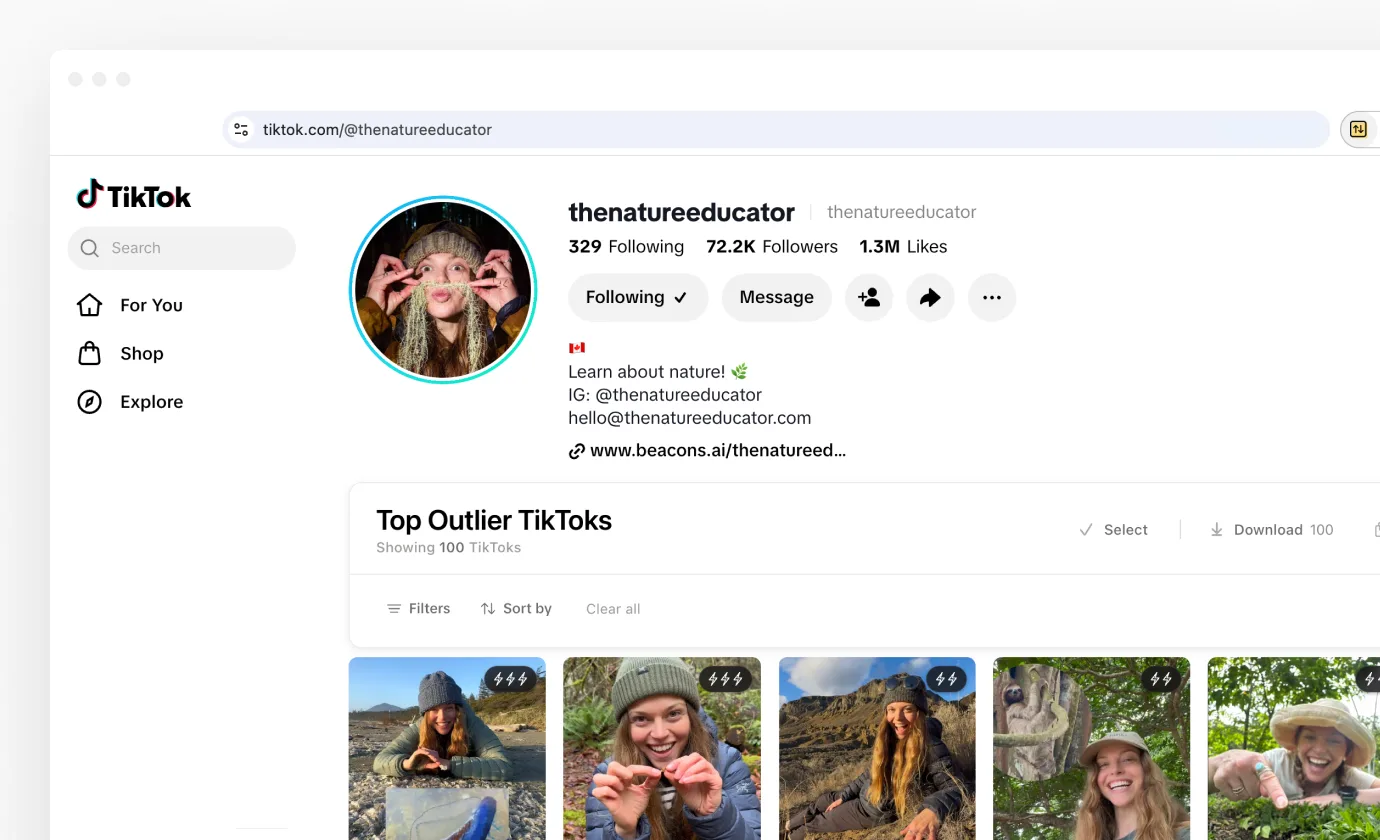
Social platforms are built around what's new. Research is about what worked. Sort Feed closes that gap. It reads the posts a page has already loaded, ranks them by the number you care about, and lays them back out in the same grid you were looking at.
It runs on top of the site, in your browser. You stay on Instagram, TikTok, Facebook or YouTube, signed in as yourself, looking at the same profile in a far more useful order. Nothing is posted, liked, followed or saved on your behalf, and refreshing the page puts the feed back the way it was.
Sorting is the front door. Once a feed is ranked, the same posts can be exported to a spreadsheet, downloaded, transcribed, or watched one after another without leaving the page.
Ranking a feed
You choose two things: how much of the profile to look at, and how to rank it. The first is a number of recent posts or a stretch of time. The second is one of these, and How sorting works covers both in full.
- Views, where most research starts.
- Likes, a read on how much people liked the idea.
- Comments, for the posts that got people talking.
- Shares and saves, on TikTok and Facebook. A save means somebody planned to come back to it.
- Outlier score, which compares a post to that creator's own average, so breakouts rise to the top.
- Oldest first, for where a format started.
More than sorting
A ranked feed is the start of the work, not the end of it. Everything below is built into the same banner that appears once a sort finishes, and most of it works on posts you never sorted at all.
Export the data
Copy puts the sorted list on your clipboard as rows and columns, so it lands in a spreadsheet as a proper table. Export writes a CSV, JSON or Excel file. Google Sheets goes one better and creates a formatted spreadsheet in your own Drive, then opens it.
Every export carries the profile, the link, the date, views, likes, comments, shares and the caption, plus transcripts when you have them. Exporting your data lists every column.
Download the clips
Save any reel or video without a watermark. Download on the banner takes the whole sorted grid in one go, which is how most people build a swipe file for a script session.
You don't have to sort first. On Instagram, TikTok and Facebook, a Download button sits on posts while you browse normally, and on the post you are already watching. Downloading media has the rest.
Transcribe the audio
Turn what's said in a video into text. Run one video on its own, or run a batch across a sorted grid and let it work while you do something else. Transcribing videos covers both.
Transcripts flow into your exports, so a single spreadsheet can hold the hook, the script and the numbers side by side. That is usually the point: it's what makes a set of references searchable.
Watch without losing your place
On Instagram, TikTok and Facebook, clicking a post in a sorted grid opens it in the player, over the page. You can move through the top posts one after another, and the grid stays exactly where you left it. Studying twenty hooks in a row stops being twenty round trips through the profile.
Work with a subset
Select mode lets you tick the posts you actually care about and apply any of the above to just those. It's the right tool when you want six references, not sixty, and it lives on the same banner as everything else in After you sort.
Ask Claude or ChatGPT
With Sort Feed MCP connected, you can ask Claude or ChatGPT in a sentence to sort an Instagram profile, a search or your saved posts. The sort runs through the Sort Feed in your browser, and the top posts come back in the chat with a Google Sheet, CSV, JSON or Excel file. It's a Pro feature and covers Instagram today.
Where it works
Sort Feed works on the pages where research actually happens, not just on profiles. Features vary a little by platform, and What works where has the full picture.
- Instagram: profiles (Posts and Reels), Explore search results, and Saved, including individual collections.
- TikTok: profiles, search results, Favorites, Liked, and collections.
- Facebook: reels on a profile, your own reels, and saved reels.
- YouTube: Videos and Shorts on any channel.
Your data
Sort Feed never asks for your Instagram, TikTok, Facebook or YouTube password, and it can't see one. It reads the data the page you're already signed into has loaded, and does the sorting in your browser.
Two things leave your machine, and only when you click them. Transcription sends the video's audio to Sort Feed's transcription service and the text comes back. Save keeps the post, with a copy of its cover and video, in your Sort Feed account. Sorting, filtering, exports and downloads all happen on your computer.
If you connect Sort Feed MCP, the results of the sorts you ask Claude or ChatGPT for go to that app as well. Your Instagram session never does.
Free and Pro
The free plan is a working tool, not a trial. It sorts the latest 25 posts or one week of content on any supported page, includes every sort, and comes with exports and unlimited downloads.
Pro removes the ceiling. Sort up to 1,000 posts or everything a profile has, set a custom post count or date range, transcribe as many videos as you like with transcripts in your exports, and sort Instagram from Claude or ChatGPT.
Pro is $10 a month billed yearly, or $15 month to month, and you can start free without signing up for anything. Plans & billing covers what happens either way.
Where to start
Install Sort Feed covers adding it to your browser and pinning it, which takes about a minute. Your first sort then walks through one complete sort, from an empty profile page to an exported spreadsheet.
After that, What works where is the page worth bookmarking. It lists exactly which features are available on each platform and page.