 Sort Feed
DocsPlayer
Watching sorted posts
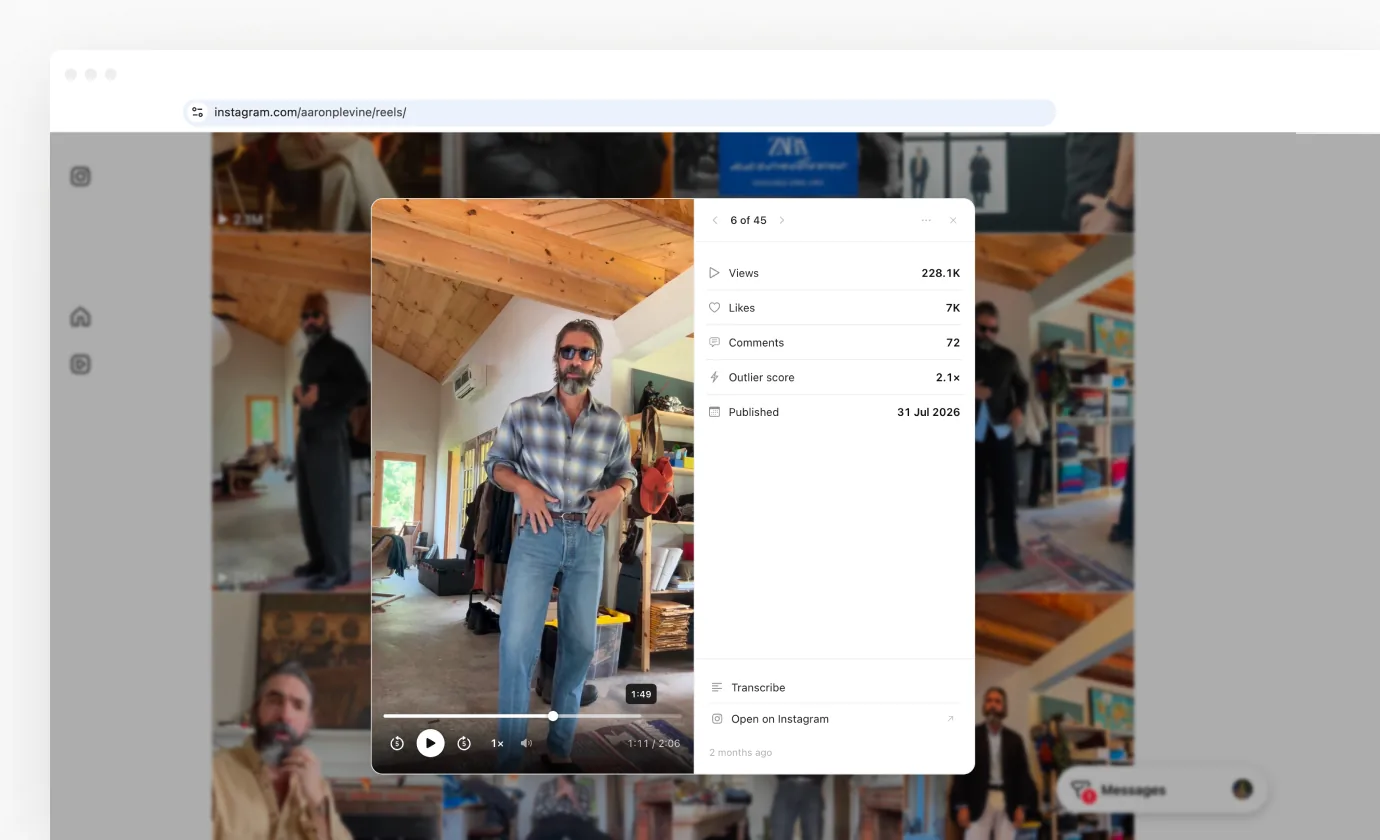
Clicking a post in a sorted grid opens it over the page instead of taking you to it, on Instagram, TikTok and Facebook. The grid stays exactly where you left it.
Why it exists
Studying twenty hooks in a row used to be twenty round trips: click a post, watch it, go back, find your place in the grid again, and hope the sort survived.
The player removes all of that. It opens over the sorted grid, and closing it puts you back exactly where you were, with the same order and the same scroll position.
What it shows
The post plays on the left. On the right sit the numbers the sort already collected, the caption, the publish date, and your position in the grid, such as 4 of 25.
The numbers follow the platform: views, likes and comments everywhere, shares on TikTok and Facebook, saves on TikTok, and the outlier multiple when you sorted by outlier score. It's the same record the export carries, laid out for reading rather than for a spreadsheet.
Photo posts and carousels open in the same player. A carousel becomes a set of slides with dots underneath, and the numbers stay beside it.
Moving through the grid
The arrow keys step forward and back through the sorted order, so you can watch the top twenty posts one after another without touching the page behind. Escape closes the player.
Because the order is your sorted order, this is the fastest way to review a ranking: hooks in descending performance, one keypress apart.
Next
Controls & shortcuts lists everything under the video and every key. Platforms & settings covers where it runs and how to turn it off.